


Here, our aim is to empower you to identify trends, seize learning opportunities, and pinpoint areas for improvement within your dataset. By providing insights into interpreting the data, we’re here to assist you in unlocking its potential to recognise patterns, grasp learning prospects, and strategically enhance various aspects of your efforts.
HACT Social Value Bank
The HACT Social Value Bank is designed to measure the positive impact of small organisations (turnover less than £350,000 last financial year).
Before you start using this tool, you should refer to the related Guide (Measuring the Social Impact of Community Investment: A Guide to using the Wellbeing Valuation Approach) and support materials. The Guide provides an introduction to the approach, and the supporting materials are an update to this. These are available here.
Accessing Open-Source Data
Data can play a crucial role in understanding the people and places we work with, as well as highlighting the ‘need’ and importance of our work. Open-source datasets can serve as a valuable resource to gather information that demonstrates the necessity of our work to funders.
Below are some key platforms for accessing open-source datasets.
- Gov.uk – provides access to various datasets from different government departments. Relevant datasets that can be sourced through Gov.uk include:
Some of these datasets are available on Stat-Xplore, which is a tool that can used to create your own data tables and analysis. A Stat-Xplore guide can be found here: User Guide (dwp.gov.uk)
- Sport England data page – Offers a variety of reports and interactive tools designed to help you explore data related to physical activity. On their data page, you’ll find two main sections: ‘data about people’ and ‘data about places’. The ‘data about people’ section allows you to explore the results of the Active Lives survey. In the ‘data about places’ section, you can access data concerning sports facilities in your local area.
- Social Mobility Commission – The social mobility commission State of the Nation report looks at full mobility outcomes, intermediate (early-life) outcomes, and drivers, with breakdowns by geography and personal characteristics. The State of the Nation Report is released annually, alongside a Data Explorer Tool. The accompanying Data Explorer tool allows users to explore comparative data across local authorities. Particularly relevant are the indicators related to children and young people, including measures around childhood poverty. The tool presents data at regional and local levels.
- Joseph Rowntree Foundation (JRF) – JRF are an independent social change organisation, that conducts research on poverty in the UK. The data presented in the link below is from their 2025 UK Poverty report, setting out the trends and impacts of poverty across the UK.
Engagement Level Matrix
The engagement level matrix is a useful tool that helps quantify participant levels of engagement, using a scale of 1 to 5.
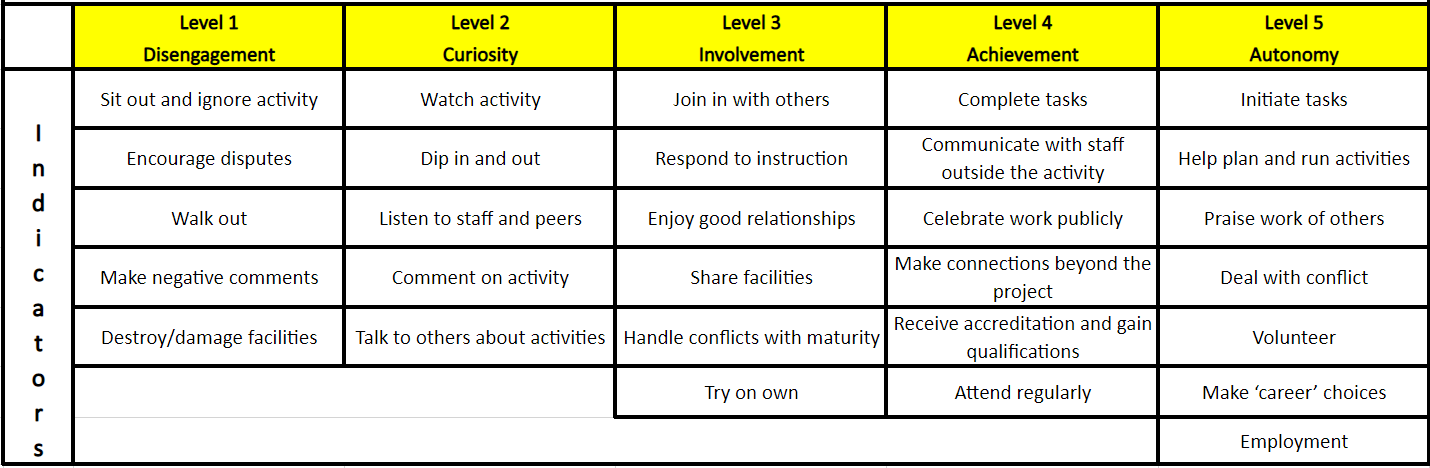
It works on the basis of a coaching updating a participant’s engagement at least twice, ideally once at the initiation of the programme or arrival of the participant, then at intervals until the end of the programme, or departure of the participant.
The table provides indicators to show where a participant may be at different stages of their involvement. (It may be useful to refer to this before, during or just after sessions, to help identify participant progression/digression easily while memory is fresh). The five categories can also be added to Views or Upshot accounts, should a Community Partner wish to record this in their account along with their attendance data.
The engagement level matrix is a great way to help provide a well-rounded evaluation of your sessions, especially when combined with robust attendance data. This tool has been used in several StreetGames interventions, particularly in ‘Safer’ strands of work with individuals that are typically harder to engage.
Mapping
Interactive maps can be a highly effective method of demonstrating the impact of our work. A number of tools can be used to develop data visualisations on maps, which can help demonstrate impact to funders and show visual representation of your delivery. Below are some links to various options with further information.
Excel
At StreetGames, we would always recommend using a safe and secure monitoring system, such as Views or Upshot to record your participant and attendance data. However in some cases, you may have to record this data in Excel, or perhaps you have exported this data into Excel from a monitoring system, to perform analysis.
If you have collected data via an online survey, depending on what platform and level of paid/free account you have used, you may need to export the responses to Excel, to be able to analyse the data.
Excel can be a great tool for analysing data, especially if you know all the ‘tricks’ which are commonly done by using a ‘formula’. Here are a few, that our Research & Insight team would regularly put to use when ‘cleaning’ and formatting data for analysis.
- Conditional Formatting
- SUM
- AutoFilters
- Pivot Tables
- COUNTIF Formula
- VLOOKUP Formula
You can watch a full YouTube tutorial on Excel courtesy of Datawise London here.
Other MEL Kit-bag guides

MEL Kit-Bag: Collect
In this section, you will find valuable tips, tools, and resources to guide you on what information to gather and how to go about it, addressing the common challenges of data collection.

MEL Kit-Bag: Present
This section focuses on empowering you to effectively communicate your findings, celebrating progress, and showcasing the impact of your projects to various stakeholders.

MEL Kit-Bag: Top Tips
This section includes some examples of the tools and templates that are available to support your monitoring and evaluation approach.